
INFOS
Integrated Nowcast/Forecast Operation System
for Yahara Lakes
Partnership






Help
Using the 3D Circulation Model Animation Tools
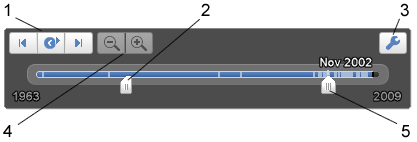
Google Earth Animation Toolbar
- Click to play animation. Use adjacent buttons to step forwards or backwards.
- Drag the range marker to the right or left to redefine the time range of data displayed.
- Click to set options for the time slider (date and time).
- Zoom in/out to shorten/lenthen date range covered by timeline.
- Drag this to move the time range earlier or later.